The artificial intelligence landscape has matured significantly. For digital marketers, e-commerce managers, and creative designers, generating high-fidelity visual assets quickly is no longer an experimental luxury—it is a baseline requirement for remaining competitive. At the center of this workflow is a powerful visual generation engine. However, unlocking its true commercial potential requires more than just typing a few descriptive words into a chatbox; it requires mastering the exact syntax and structure of a GPT Image 2 Prompt.
If you are consistently struggling with unpredictable outputs, distorted human anatomy, or lighting that feels distinctly artificial, the issue is likely not the AI model itself. The bottleneck is the instructions it receives. Writing a perfect GPT Image 2 Prompt is a deliberate, highly technical engineering process.
This comprehensive 2026 guide is designed to completely transform the way you interact with AI image generation. We will provide a factual breakdown of the model's capabilities, explore rigorous professional use cases, conduct an objective comparison with its main rival Nano Banana 2, and dissect the anatomical structure of successful commands. By the end of this definitive guide, you will be equipped with advanced, ready-to-use prompt templates that will elevate your entire visual content strategy.
Understanding GPT Image 2: A Technical Overview
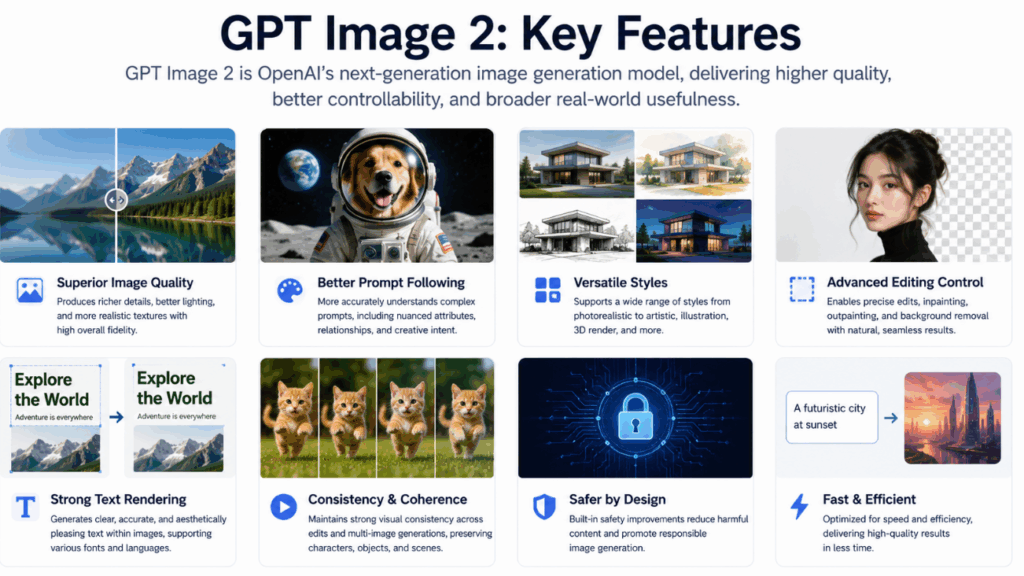
To consistently generate stunning, commercial-grade visuals, you must first understand the operational logic of the model you are commanding. When you write a GPT Image 2 Prompt, you are interacting with a system optimized for high precision and semantic adherence. Here is a factual look at its core capabilities:
- Exceptional Prompt Adherence: The defining characteristic of this model is its ability to listen to complex, multi-layered instructions. If your prompt contains a dozen distinct constraints—such as specific hex colors, background elements, and camera angles—the model is highly capable of rendering all of them without dropping details at the end of your sentence.
- High-Fidelity Text Rendering: A massive leap forward for marketing professionals is the model's ability to render legible typography. It can seamlessly integrate spelled-out words, logos, and short phrases directly into the generated image with minimal spelling hallucinations.
- Advanced Spatial Awareness: The model possesses a deep understanding of spatial relationships and compositional grids. Terms like "in the foreground," "blurred in the background," or "placed symmetrically on the left third" are interpreted with strict photographic accuracy.
- Versatile Aesthetic Control: Whether your project requires a photorealistic macro product shot, a flat vector UI illustration, or a cinematic 3D render, the model dynamically adapts its rendering engine based entirely on the specific stylistic keywords you provide.
The Anatomy of a Perfect GPT Image 2 Prompt
A common mistake among beginners is treating an AI image generator like a traditional search engine. AI models do not interpret vague intentions; they parse structured data. To achieve professional, repeatable results that require zero post-production, your prompts must follow a logical architectural framework.
We highly recommend utilizing the S.E.L.F. Framework for structuring your commands: Subject, Environment, Lighting, and Format.
1. Subject (The Core Focus)
Never be vague about your main subject. Instead of writing a generic noun, you must specify the exact nature, material, and condition of the object.
- Weak: A coffee cup on a desk.
- Strong: A matte black ceramic espresso cup filled with dark crema coffee, featuring a subtle wisp of steam rising from the surface.
2. Environment (The Context)
The environment grounds your subject and prevents the AI from generating blurry, nonsensical backgrounds. It provides the necessary context for light to bounce and shadows to form.
- Weak: In a kitchen.
- Strong: Placed on a rustic reclaimed wood table next to a folded linen napkin, scattered roasted coffee beans, and a silver spoon.
3. Lighting (The Professional Polish)
Lighting is the single most important factor in a GPT Image 2 Prompt. It is the element that separates amateur AI generations from commercial-grade studio assets.
- Keywords to integrate: Cinematic lighting, volumetric rays, softbox studio lighting, golden hour, neon backlighting, harsh shadows, diffuse morning light, chiaroscuro.
4. Format and Style (The Aesthetic)
You must explicitly tell the AI what "lens" it is looking through or what "medium" it is painting with. Are you creating a digital photograph, an oil painting, or a vector graphic?
- Keywords to integrate: 35mm photography, macro lens, isometric 3D render, flat vector UI design, depth of field (f/1.8), tilt-shift, ultra-wide angle.
Professional GPT Image 2 Prompt Use Cases & Testing
To demonstrate the power of this structured approach, let us examine real-world commercial applications. We tested the model against high-pressure scenarios to see how it performs when business metrics are on the line.
Use Case 1: High-End E-Commerce Product Photography
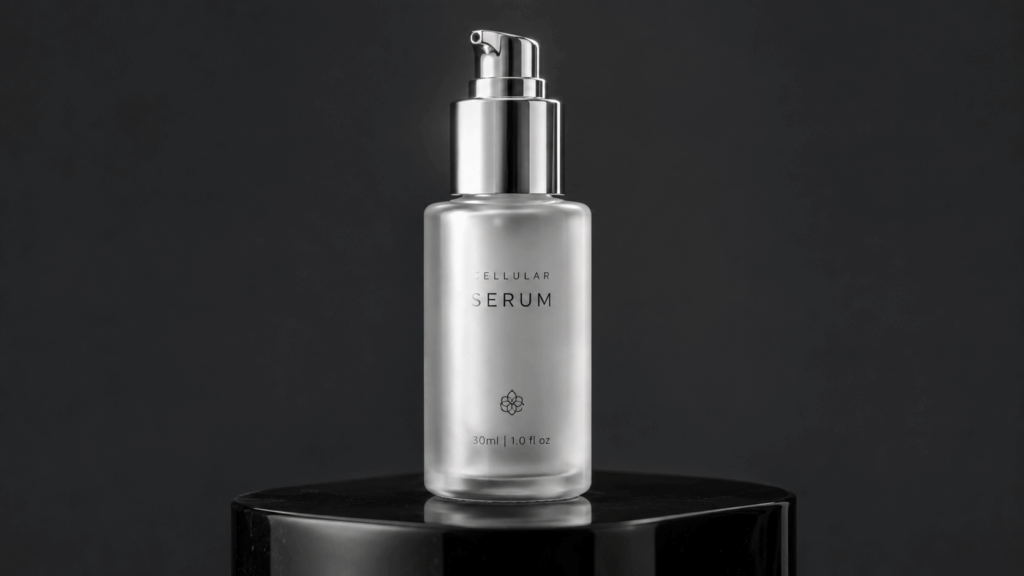
E-commerce businesses spend thousands of dollars on physical studio photography. With a precise GPT Image 2 Prompt, you can mock up product concepts instantly, iterate on packaging designs, and create lifestyle shots without ever booking a photographer.
- The GPT Image 2 Prompt: A photorealistic, macro photography shot of a minimalist, frosted glass skincare serum bottle with a polished silver pump. The bottle is resting on a highly reflective black obsidian podium. The background is a seamless dark gray studio sweep. Lighting is provided by a single overhead softbox, creating a smooth, elegant white reflection down the side of the glass bottle. Shot on 85mm lens, extreme detail, 8k resolution.
- The Result: The model accurately captures the difference in texture between the rough frosted glass and the smooth silver pump. The overhead lighting constraint is perfectly obeyed, giving the image a premium, expensive feel suitable for a flagship store.
- Actionable Advice: If you are managing an online store and need to visualize new product lines, you can directly test GPT Image 2 to streamline your product catalog creation.
Use Case 2: Marketing Assets and Social Media Campaigns
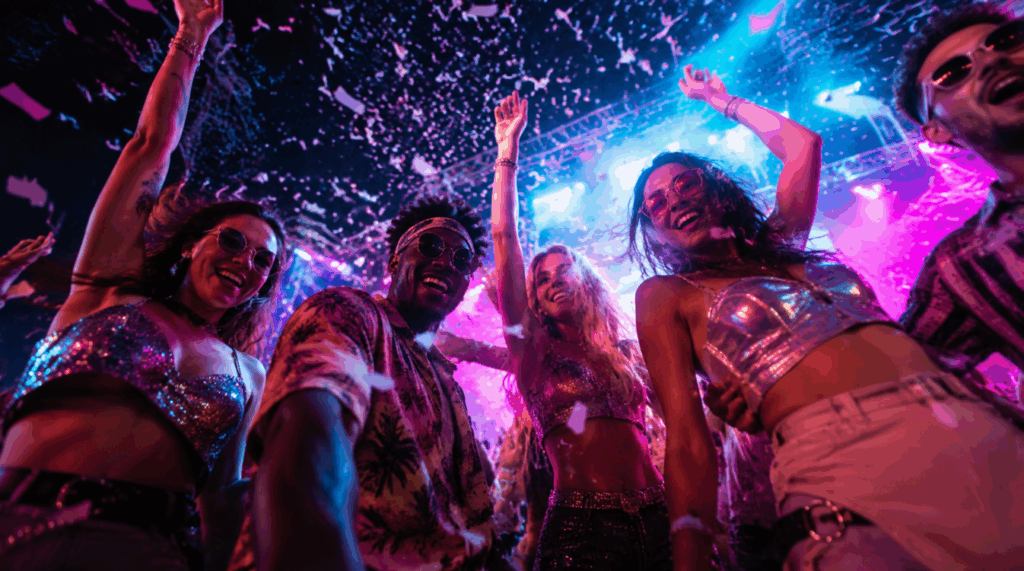
Social media requires high-contrast, visually arresting images that stop users from scrolling. Marketers need assets that convey emotion and energy while remaining brand-safe.
- The GPT Image 2 Prompt: A vibrant, high-energy promotional image of a diverse group of young adults dancing at an outdoor summer music festival. The perspective is a dynamic low-angle shot looking up at the subjects. The scene is illuminated by dramatic stage lighting in neon cyan and magenta. Confetti is falling through the air. Cinematic, high contrast, hyper-realistic, dynamic motion blur.
- The Result: The model excels at blending multiple colored light sources. The cyan and magenta lights cast realistic colored shadows on the subjects, and the low-angle perspective adds the necessary kinetic energy required for social media advertising.
Use Case 3: Architectural and Interior Concept Design
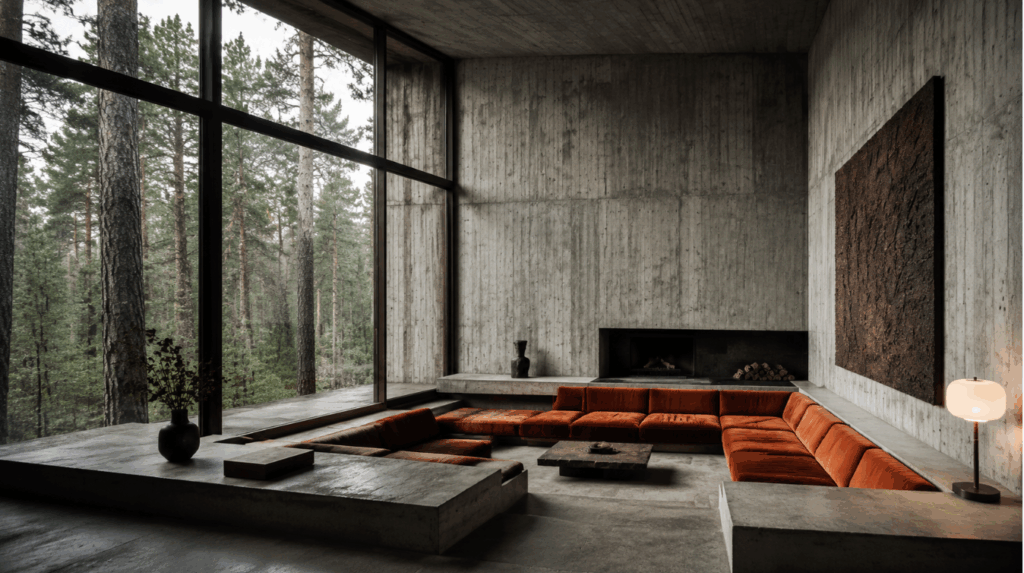
Interior designers and real estate marketers can use the model to generate rapid mood boards, allowing clients to visualize spaces before construction begins.
- The GPT Image 2 Prompt: An architectural interior shot of a modern, brutalist living room. The walls are exposed raw concrete with subtle texture. Large floor-to-ceiling windows reveal a dense pine forest outside. The room features a sunken conversation pit with burnt orange velvet cushions. Natural overcast daylight fills the room, creating soft, diffuse shadows. Photorealistic, architectural digest style, wide-angle lens.
- The Result: The prompt's strict definition of materials (raw concrete vs. soft velvet) and lighting (overcast daylight) forces the model to generate an image that looks like a professional architectural rendering rather than a stylized cartoon.
GPT Image 2 vs. Nano Banana 2: An Objective Review
In the current AI ecosystem, professionals frequently find themselves choosing between GPT Image 2 and its formidable competitor, Nano Banana 2. Understanding their distinct differences is crucial for optimizing your creative workflow.
Where GPT Image 2 Excels (Instruction & Typography)
GPT Image 2 is built for absolute precision and semantic depth. If your workflow demands strict adherence to complex instructions, this is your definitive tool of choice.
- Flawless Text Integration: If you need to generate a billboard, a UI mockup, or a t-shirt design with specific text, GPT Image 2 handles typography with industry-leading accuracy.
- Complex Instruction Parsing: If your GPT Image 2 Prompt is a full paragraph long with hyper-specific details about the placement of five different objects, the model is significantly less likely to "forget" elements compared to competing diffusion models.
- Photorealistic Nuance: For tasks requiring lifelike human skin textures, accurate macro photography, and realistic physical lighting interactions, GPT Image 2 consistently delivers a highly photographic, editorial finish.
Where Nano Banana 2 Wins (Speed & Stylization)
Nano Banana 2, conversely, is optimized for different creative priorities, making it a strong contender for specific use cases.
- Lightning-Fast Generation: Nano Banana 2 is renowned for its sheer speed, often generating visual concepts in a fraction of the time. If you need to generate hundreds of iterative concepts for a brainstorming session, it holds a distinct advantage.
- Vibrant Artistic Styles: For anime, highly stylized vector art, or exaggerated 3D cartoon renders, Nano Banana 2 often achieves these specific looks with shorter, less complex prompts. It has a natural bias toward high-saturation, punchy aesthetics that work well for gaming assets.
The Verdict: If you are an illustrator looking for rapid, stylized inspiration, Nano Banana 2 is excellent. However, if you are a commercial designer, marketer, or product manager who needs absolute control, text generation, and precise execution of a detailed GPT Image 2 Prompt, then GPT Image 2 remains the undisputed industry standard.
Advanced Prompt Engineering Strategies (Recommended Prompts)
To help you bypass the trial-and-error phase, we have engineered a selection of highly optimized prompt templates. You can copy these directly, replace the bracketed variables, and achieve professional results immediately.
1. The "Isometric 3D Icon" GPT Image 2 Prompt

Perfect for UI/UX designers needing custom graphics for landing pages, web applications, or software presentations.
- The Prompt: A flawless 3D isometric illustration of a [laptop computer surrounded by floating data charts and graphs]. The design is clean, minimalist, and utilizes a soft, pastel color palette of [mint green and soft lavender]. The object is resting on a solid, vibrant [yellow] background. Soft claymorphism texture, studio lighting, smooth gradients, highly detailed, 8k, Behance style.
- Why it works: By specifying "isometric" and "claymorphism," you force the model out of its default realistic style and into a structured, digital-art format perfect for modern web design.
2. The "Cinematic Portrait" GPT Image 2 Prompt
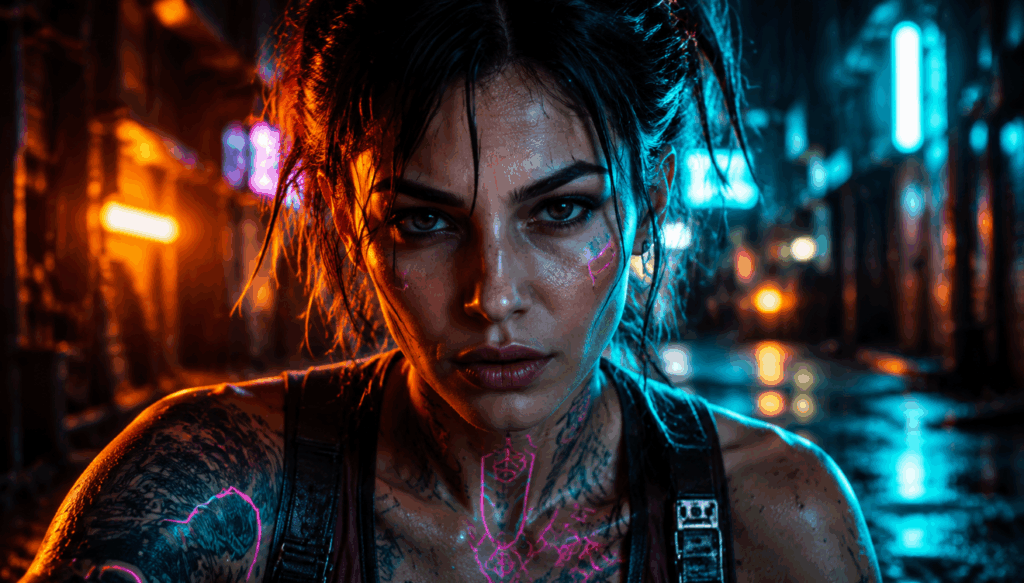
Ideal for generating diverse character models, gaming avatars, or editorial photography for magazine layouts.
- The Prompt: A cinematic, close-up portrait photography shot of a [30-year-old female cyberpunk mechanic with neon tattoos]. She is looking directly at the camera with an intense expression. The background is a [blurry, rain-slicked futuristic alleyway]. Lighting is dramatic chiaroscuro, heavily utilizing [neon blue and amber rim lighting]. Shot on 50mm lens, f/1.2 for extreme shallow depth of field, 8k resolution, highly detailed skin pores and texture.
- Why it works: This GPT Image 2 Prompt locks in the camera mechanics (50mm, f/1.2) to guarantee a blurred background (bokeh), while the specific lighting instructions (chiaroscuro, rim lighting) ensure the subject pops off the screen with professional studio quality.
3. The "Flat Vector Illustration" GPT Image 2 Prompt
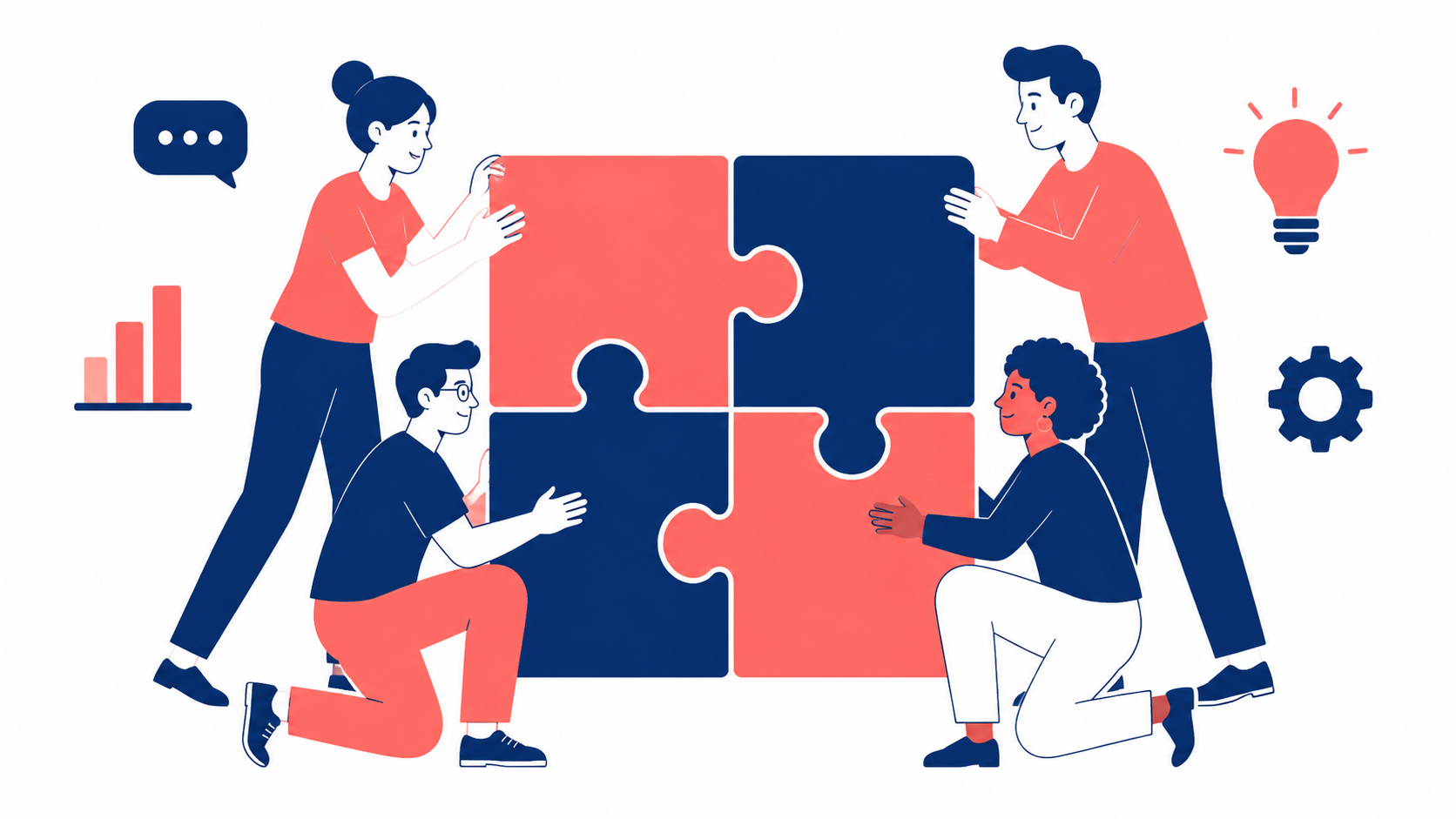
Essential for content marketers writing blogs, newsletters, or creating corporate presentations that require clean, scalable-looking assets.
- The Prompt: A modern, flat vector illustration of [a diverse team of professionals collaborating around a large puzzle piece]. The style is corporate, minimalist, and uses clean geometric shapes. The color palette is restricted to [navy blue, coral, and white]. No gradients, no shadows, pure solid colors. White background, vector art style, clean lines, suitable for a tech startup landing page.
- Why it works: AI models naturally want to add shading, depth, and realism. By explicitly stating "no gradients, no shadows, pure solid colors," you force the model to restrict its rendering engine, resulting in a clean vector aesthetic.
To truly master these templates and build a scalable content pipeline, you need an environment that allows for rapid iteration. We highly recommend leveraging PhotoGPT's generation tools to test these variables, save your favorite combinations, and streamline your daily creative process.
Final Verdict: Mastering the AI Visual Frontier
The barrier to entry for creating breathtaking visuals has been permanently lowered, but the ceiling for true mastery remains incredibly high. As we navigate the digital landscape, the professionals who stand out will not be those who simply use AI, but those who know how to communicate with it flawlessly.
Writing a successful GPT Image 2 Prompt is an intricate blend of technical exactness and creative vision. By adopting the S.E.L.F. framework, respecting the model's architectural capabilities, and studying the advanced templates provided in this guide, you will transition from a casual user into a precise prompt engineer.
Stop settling for mediocre, unpredictable, or hallucinated AI images. Take control of your visual assets, apply the rigorous standards of commercial photography to your text inputs, and watch your creative workflow transform. If you are ready to put this knowledge into practice, do not wait. Take the templates you have learned today and launch GPT Image 2 on PhotoGPT to experience the absolute pinnacle of AI image generation.