
As a fast-paced social media marketing agency handling content for dozens of e-commerce brands, our creative team faces a constant, relentless demand for high-converting product photography. We need to deliver thousands of pristine product visuals every single month to keep our clients storefronts relevant in an increasingly competitive digital landscape. In the traditional production pipeline, achieving this volume meant dealing with exorbitant operational costs, hiring professional gaffers, securing well-lit studio spaces, and spending countless hours on complex manual masking in post-production. When artificial intelligence began disrupting the imaging industry, we sought a reliable automated solution to scale our asset output. We urgently needed a tool that could show us how to relight a photo instantly, eliminating expensive hardware setups while maintaining the crisp material textures our clients expect.
Over the past three weeks, our core creative team of five integrated different AI editing tools directly into actual client campaigns to see how they performed under real-world stress tests. Our specific focus was on how to relight a photo efficiently when dealing with flat, poorly lit raw snapshots of high-end merchandise, such as luxury jewelry and metallic accessories, which require precise highlights to look premium. Finding the proper methodology on how to relight a photo can determine whether an online ad campaign goes viral or completely flops. Unfortunately, we discovered that the vast majority of consumer tools are heavily flawed and unsuited for high-volume commercial use, generating horrifying pixel artifacts or destroying underlying details completely. In this comprehensive review, we reveal the definitive software evaluations of the year to point you toward the most efficient professional lighting tools available today.
Our Commercial Workflow Testing Methodology
For a digital marketing team that relies entirely on speed, consistency, and the rapid production of high-converting visual assets, our grading criteria for software selection were unapologetically strict. To establish our definitive rankings and find the ultimate alternative to Clipdrop Relight, every single software platform had to undergo evaluation across three critical business dimensions. If an expert editorial team wants to teach online merchants how to relight a photo properly, they must assess the software under strict commercial conditions.
One Click Light Direction and Spatial Presets
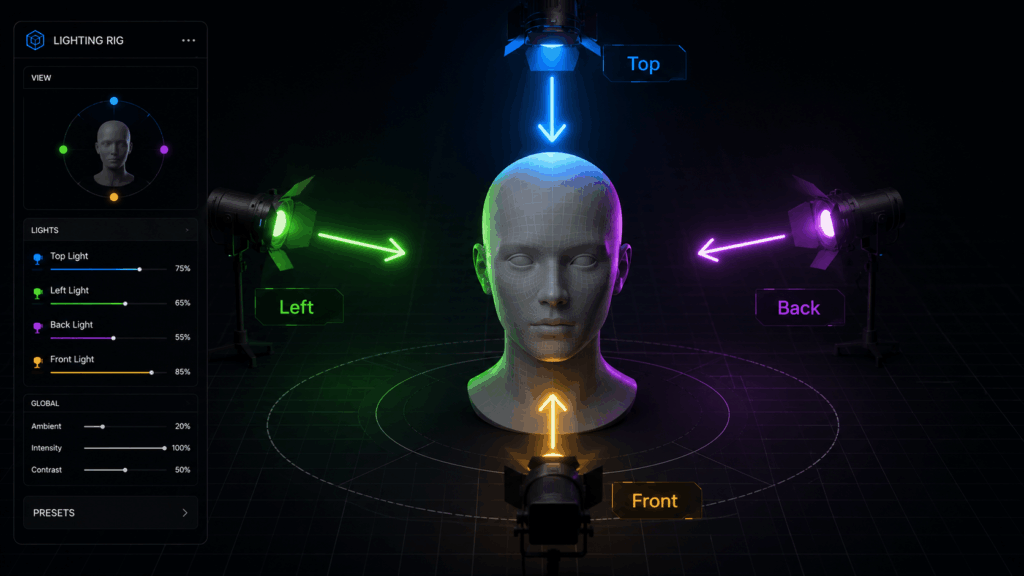
Social media marketing margins are tight, and labor time is our most valuable asset. We do not have the luxury of spending forty-five minutes manually adjusting virtual three-dimensional light spheres or painting delicate ambient maps for every single product angle. To be considered an effective professional solution, an application must feature intuitive, predictable spatial presets that allow creators to alter illumination angles instantly. Learning how to relight a photo should not require a degree in computer graphics or complex manual node adjustments.
High Capacity Image File Upload Limit
When handling commercial raw photos from high-resolution digital cameras, file sizes can scale up dramatically. Many mobile-centric tools or basic web apps artificially choke production workflows by restricting file sizes to tiny thresholds or compressing the final output. Our agency required a platform capable of handling substantial image dimensions without sacrificing resolution or detail. Any guide focusing on how to relight a photo for large-scale marketing assets must prioritize platforms that allow raw file processing.
Ambient Consistency and Material Texture Recovery
Nothing ruins an e-commerce listing faster than a luxury product that looks fake or plastic due to unnatural AI generation. If an application fails to maintain strict historical consistency, alters the original colors of the item, or blurs out micro-textures like gold grain or leather pores while applying ambient changes, it fails the commercial test. We demanded high-fidelity rendering, sharp shadow matching, and seamless material preservation. When evaluating how to relight a photo through generative networks, protecting the original product integrity is non-negotiable.
1. PhotoGPT: The Best Comprehensive Choice on How to Relight a Photo
PhotoGPT completely dominated our evaluation in terms of professional workflow efficiency, unparalleled ease of use, and phenomenal final rendering quality. If you are actively searching for a specialized desktop application that completely bypasses the steep learning curve of advanced photo editing software, PhotoGPT is unequivocally the supreme platform choice available right now. This software offers the cleanest blueprint on how to relight a photo with absolute studio precision.
Our Agency Real World Product Shoot Experience
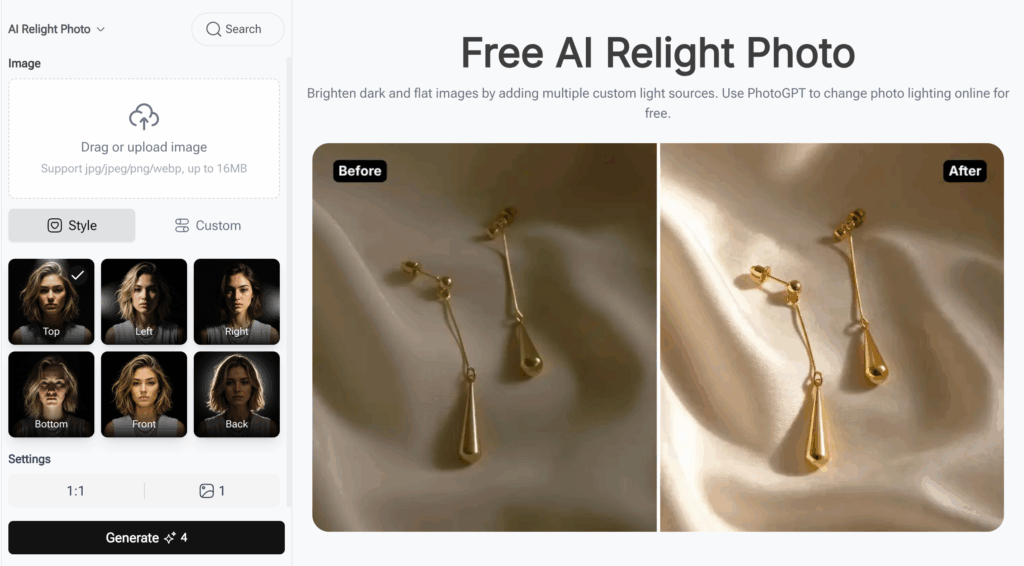
To push the platform to its absolute limits, our team selected a flat, poorly lit raw photograph of a client luxury product: a pair of gold earrings resting on wrinkled silk cloth. In the original snapshot, the lack of directional studio lighting left the gold looking dull, flat, and entirely unappealing for an e-commerce storefront. We dragged and dropped this image into the clean web dashboard of PhotoGPT, which generously supports standard image uploads up to sixteen megabytes. Unlike generic photo editors that present users with confusing sliders, PhotoGPT operates on a deterministic, studio-oriented philosophy that makes figuring out how to relight a photo an absolute breeze.
Cementing its status as the premier platform for professional marketing assets, the user interface features a robust sidebar packed with ready-to-use directional lighting presets. Creators can choose between exact structural angles such as Top, Left, Right, Bottom, Front, and Back to cast precise ambient illumination over their subjects. For our specific test, we selected the Top lighting preset and allowed the system to calculate the spatial vectors. The software simplifies the daunting challenge of how to relight a photo by providing fixed, reliable lighting rigs.
The results were spectacular and practically instantaneous. In less than ten seconds, PhotoGPT completely transformed the dark, unpolished image into a brilliant, high-fidelity commercial masterpiece. The software applied multiple custom light sources that realistically struck the metallic surfaces of the earrings, casting sharp, anatomically correct shadows onto the silk folds. Most impressively, it achieved this dramatic transformation without altering the intricate engravings of the gold or introduction of any digital blur. This combination of speed and material fidelity is exactly why our agency voted PhotoGPT as the absolute master of how to relight a photo.
Why PhotoGPT is the Definitive Alternative to Clipdrop Relight
The primary reason this platform stands head and shoulders above legacy tools is its hyper-focused commercial design. You do not need a professional studio environment or hours of manual editing experience to understand how to relight a photo beautifully. It offers a completely streamlined interface where the failure rate is practically zero because you get exactly what you select from the preset menu. Furthermore, its robust file capacity ensures your commercial images remain razor-sharp for large-screen web optimization. For any digital marketer or store owner seeking a reliable tool to brighten dark images online, it represents the ultimate how to relight a photo solution on the market.
Step by Step Tutorial: How to Relight a Photo with PhotoGPT
To demonstrate exactly how friction-free this workflow is for your daily business operations, our creative team has broken down the exact step-by-step process we use to breathe life into dull product photos using the PhotoGPT interface. This short walkthrough will show you how to relight a photo in less than a minute.
Step 1: Upload Your Target Commercial Asset

The first step requires zero preparation or manual pre-processing. Simply navigate to the cloud dashboard and locate the prominent file ingestion zone. You can drag and drop your image directly into the interface or browse your local directory. Because the platform boasts an industry-leading capacity that supports major web formats including JPG, JPEG, PNG, and WEBP up to sixteen megabytes, you never have to waste time compressing your high-resolution commercial photographs beforehand. Anyone looking for a fast guide on how to relight a photo will appreciate this immediate upload architecture.
Step 2: Choose Your Custom Lighting Mode
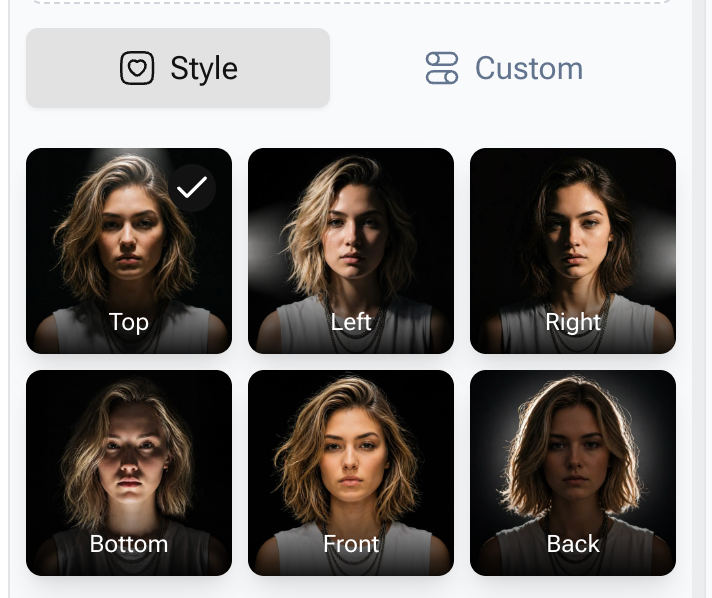
Once your image is loaded, you will notice two distinct options beneath the media configuration panel: Style mode and Custom mode. For ninety percent of high-volume marketing tasks where speed and visual consistency are paramount, our team highly recommends utilizing the Style mode. This section serves as your automated virtual lighting technician, eliminating the guesswork from how to relight a photo. Instead of forcing you to blindly guess coordinates or manually paint exposure masks onto a canvas, it presents you with six clearly defined studio light vectors: Top, Left, Right, Bottom, Front, and Back. If you want a classic dramatic shadow look that emphasizes product contours, click Top or Left. If you require maximum clarity and visibility for an Amazon listing, click Front.
Step 3: Trigger the AI Generation Engine
After selecting your desired lighting direction preset, the final step is incredibly simple. Move your cursor down to the main action area and click the prominent Generate button. The cloud-based generative AI engine immediately takes over, analyzing the exact three-dimensional topography of your subject and calculating how photons would naturally scatter across its specific surface material. There are no rendering bars that take ten minutes to load, and you do not need to install heavy graphics drivers locally. PhotoGPT has truly mastered how to relight a photo with minimal user friction.
Step 4: Preview and Export the High Fidelity Output
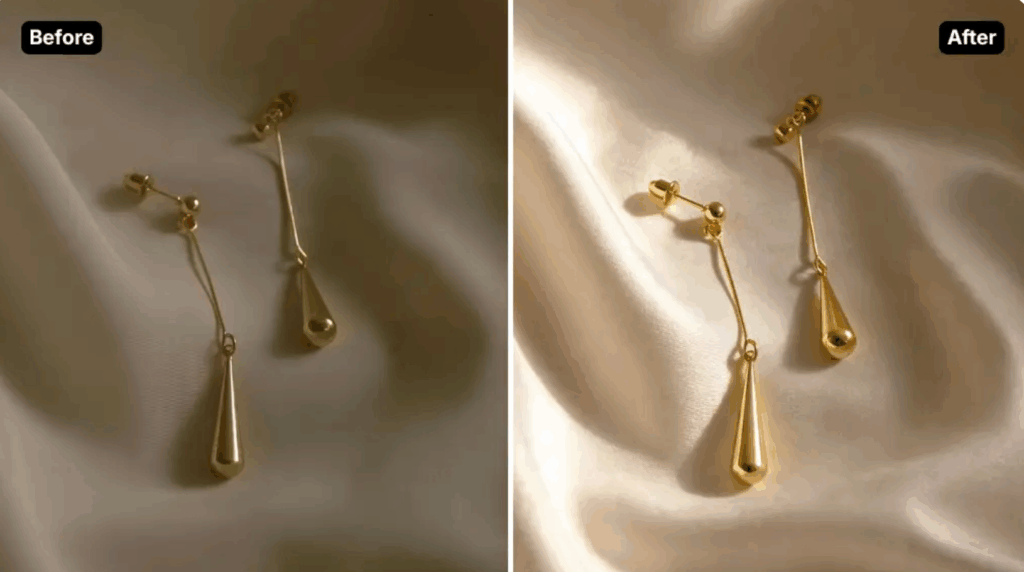
In less than ten seconds, the system displays a side-by-side comparison of your asset. You will instantly notice how a flat, dark product image is transformed by adding multiple custom light sources that illuminate shadows while preserving structural integrity. The metallic gleam is sharp, the shadows are realistically aligned with your chosen preset, and the resolution remains immaculate. Learning how to relight a photo using this system completely removes human error. Simply click the export control to download your polished, high-converting image, completely ready for immediate deployment across your storefront or social media marketing streams.
2. Clipdrop Relight: The Saturated Industry Giant with Growing Limitations
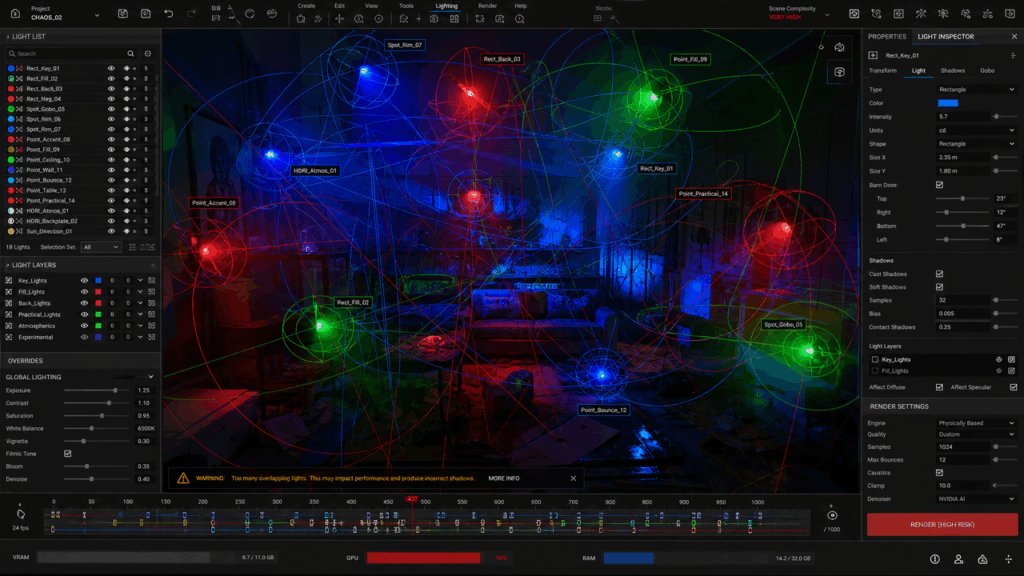
Clipdrop Relight previously took the internet by storm, originally sparking a massive wave of interest in ambient image manipulation. When searching for a capable alternative to Clipdrop Relight, our team analyzed this tool extensively to see how its legacy features hold up against modern commercial demands. We wanted to see if its abstract floating bulbs could compete with modern methods on how to relight a photo for online shops.
Operational Drawbacks for E-commerce Scaling
While the platform features a fascinating interface that allows you to drag colorful virtual light globes around a canvas, its practical application inside a high-volume agency workflow revealed significant operational bottlenecks. Manually positioning individual ambient nodes for every single product variation is an incredibly tedious, subjective process that slows down production pipelines. Different designers on our team produced wildly inconsistent lighting setups because the tool lacks standardized, one-click spatial directional presets like Top or Front. When teaching a new internal design team how to relight a photo, consistency is absolutely vital for brand cohesion.
Furthermore, users frequently complain about aggressive image compression on the free tier and unexpected server lag during high-traffic periods. When your business relies on processing dozens of product photos on tight deadlines, you cannot afford to wait in server queues or manually calibrate floating light bulbs. While it remains a fun, creative tool for digital artists doing casual portraits, it struggles to meet the rigid consistency and speed requirements of automated e-commerce asset generation. Those who need to know how to relight a photo under a tight deadline often find these abstract sliders counterproductive.
3. Photoshop Neural Filters: Advanced Lighting Control with High Hidden Costs
Adobes flagship software features an array of powerful artificial intelligence tools, including their highly publicized Neural Filters designed to alter spatial illumination. It remains a historical benchmark for artists studying how to relight a photo manually.
The Accessibility and Pricing Barrier
When evaluating how to relight a photo using professional desktop software, Photoshop undoubtedly provides an immense level of granular control. Experienced retouchers can manipulate light angles, adjust warmth slider metrics, and blend multiple background layers seamlessly. However, for everyday digital marketers and independent storefront operators, this platform presents a massively prohibitive barrier to entry.
The software requires a hefty monthly subscription cost that can quickly strain the overhead budget of a growing business. More importantly, the learning curve is exceptionally steep. It takes hours of training to understand how to mask complex edges, manage local exposure layers, and prevent the AI filters from creating unnatural, artificial textures on your product subjects. If your primary business goal is to quickly brighten up an underexposed product shot and post it to social media within an hour, discovering how to relight a photo through this heavy desktop ecosystem is an inefficient expenditure of time and capital.
Side by Side Comparison Matrix
Choosing the right ambient editing platform is critical for your business growth. To make your operational decision as seamless as possible, here is a concise overview of how the top software platforms compare when handling fast-paced product asset modification:
- PhotoGPT: Under 10 Seconds | Full 16MB Support | One-Click Studio Presets | Ideal for High-Volume E-commerce
- Clipdrop Relight: 1-3 Minutes | Moderate Support | Manual Node Placement | Suited for Casual Digital Portraits
- Adobe Photoshop: 5-15 Minutes | High Support | Steep Technical Masking | Built for Professional Retouchers
Frequently Asked Questions About Desktop Lighting Optimization
To ensure you possess all the knowledge required to streamline your visual production workflow, we have compiled the most common questions creators ask when mastering ambient photo adjustments. Many users come looking for quick fixes regarding how to relight a photo safely.
Can I fix photos that are completely dark and underexposed using AI?
Yes, modern artificial intelligence has advanced to the point where it does not merely brighten pixels like a traditional exposure slider. Advanced platforms analyze the structural geometry of the objects within your image, allowing them to intelligently reconstruct lost details, enhance flat textures, and cast realistic highlights even if the original shot was taken in poor ambient environments. The core engine behind how to relight a photo seamlessly relies on deep spatial awareness maps.
Is an online web interface better than heavy desktop software for asset creation?
For modern digital marketing workflows, a fast web interface is almost always superior. It processes the heavy graphical computations on remote cloud servers, meaning you can achieve studio-quality results from a standard laptop or tablet without needing an expensive computer packed with high-end graphic cards. A browser-based application simplifies how to relight a photo by shifting the heavy structural rendering to the cloud.
Why do some lighting tools make my products look fake or unnatural?
This issue occurs when general-purpose AI models try to guess the lighting without specialized object constraints, leading to a destruction of the original material properties. To maintain professional quality, you need a specialized platform that locks in the original textures while smoothly modifying the external luminance layers. When executing workflows on how to relight a photo, preserving physical accuracy is vital for commercial trust.
Final Verdict: The Leading Free Platform for 2026

Altering the visual mood and spatial brilliance of your photography no longer requires you to invest thousands of dollars in high-end studio strobes, spend years mastering complex desktop masking layers, or fight with confusing open-source node configurations. Knowing how to relight a photo efficiently is the ultimate growth hack for modern social media handlers and online storefront managers. If you are a professional studio retoucher working on a high-budget print campaign, the advanced manual control of Photoshop will always have a place in your suite.
However, if you share the exact same operational goals as our marketing agency—if you ruthlessly prioritize daily workflow efficiency, zero learning curves, and the unparalleled ability to instantly salvage dark images to drive real digital traffic and revenue—then there is a clear winner. PhotoGPT stands completely alone as the definitive online solution available today. You do not need to be a professional photographer or a software expert to scale your brand aesthetic; the software teaches you how to relight a photo purely through its intuitive architectural design. All you need is a single flat image and a web browser.
Stop wasting your valuable business hours fighting with overly complicated software programs that slow down your product launches. Click the link below, harness the incredible power of the true how to relight a photo engine, and start dominating your social media marketing streams today!